
 Visual Arts Brampton
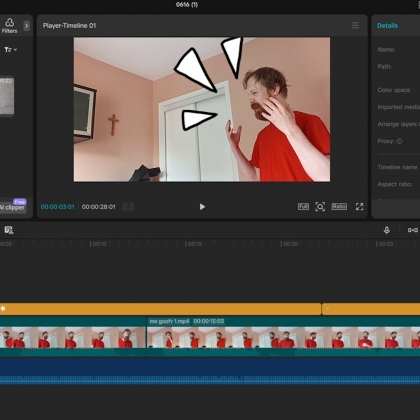
Learn the basic of video editing and simple cinematography! This course is beginner level, for anyone who wants to learn video editing as a hobby or for future career endeavors. Using iPad's, laptops or any other compatible device that students own themselves and will bring in, we will learn how to record videos, upload them to our devices, import them to the software and work on them to make our own short videos. This is a great class for anyone looking to get into video editing add/or acting, and gives students a chance to make their own YouTube or TikTok short videos.
Students will be required to bring in their own devices, and are expected to have the free app "Capcut" already installed on it for the first day and beyond. For laptop users, "Capcut" is required. For iPad users, "Capcut iPad" version is required.
Details
Ages: 9-18
Dates: Thursday, November 5 to December 17, 2026
Time: 6:45pm - 8:15pm
Sessions: 7
Price: $175
Materials: Not Included - See Materials List
Skill Level: All Skill Levels
What Students Will Learn
- How to record videos using an iPad or smartphone and properly upload and manage the files on their devices.
- Hands-on editing with CapCut, gaining foundational skills (like cutting and assembling clips) that easily transfer to other editing software.
- How to elevate videos using advanced tools, including effects, transitions, audio/volume control, animations, and text.
- The theory and application of film angles, zooming, and framing, along with the storytelling purpose behind each technique.
About the Instructor
 Paul Makowski
Paul has 7 years of experience in animation, having worked on 2 animated series productions for TV/Streaming ("Open Season: Call of Nature", and "Best & Bester"), on animated promotional material for various organizations, as an animation instructor and on his own weekly projects. He possesses a strong understanding of the animation principles and process, including timing, posing, staging and exaggeration. He is also proficient in various animation software, including Toon Boom Harmony, Adobe Animate, Spine, Maya and Blender.
In the mid 2010's, Paul studied and practiced art at Sheridan College, Toronto School of Arts and Visual Arts Brampton. After that he moved into studying animation, and then got his first production job working at Nelvana in the early 2020s.. Afterwards, he furthered his animation career working with Brown Bag Films, Shift Grit Psychology and Counselling, Parkaway Cinema and Project Comte Jewelry. He has recently gotten into teaching, with his first animation instructor job at Algorithmics Brampton West.
Materials
- Required:
- iPad, tablet or laptop with the free software "Capcut" installed.
- Optional:
- Phone with connecting cable (or other method to connect to your device) to iPad or Laptop device to record videos with if you can't record with the iPad or Laptop.